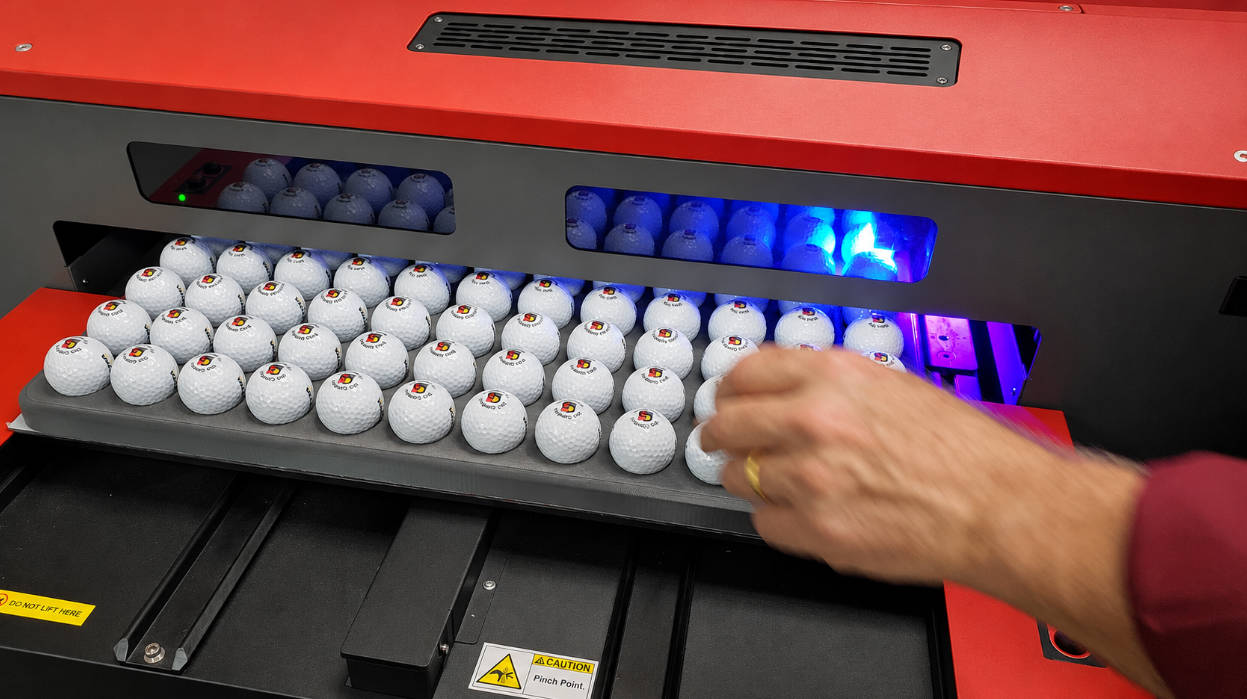
Have you ever wondered how company logos, brand names, numbers, and custom graphics are printed on golf balls? Unlike printing on a flat plastic surface, decorating a golf ball presents a unique manufacturing challenge. Its spherical shape and hundreds of small dimples make consistent ink transfer more difficult.
Two technologies are commonly considered for golf ball decoration: pad printing and UV printing. Both can apply logos and graphics, but they work differently and suit different production requirements.
Pad printing is particularly suitable for repetitive golf ball logo production, especially when designs use a limited number of solid colors. UV digital printing offers greater flexibility for full-color artwork, gradients, and frequently changing designs, but printing directly onto a curved, dimpled surface requires compatible equipment and careful process validation.
For manufacturers, the decision should depend on artwork complexity, production volume, printing accuracy, ink adhesion, and total operating cost.
This guide explains how golf ball logos are printed, how pad printing compares with UV printing, and what equipment manufacturers should consider when setting up a golf ball printing production line.

Why Is Printing on a Golf Ball Different?
A golf ball looks relatively simple, but its surface creates several challenges for industrial printing.
Unlike a flat plastic component, a golf ball has three important characteristics.
1. Spherical Geometry
The printing surface curves in multiple directions. The printing equipment must maintain consistent contact or printing distance across the selected area.
2. Dimpled Surface
Golf balls contain numerous small depressions called dimples. These affect how ink contacts the surface and how consistently the image is reproduced.
3. Specialized Cover Materials
Golf balls commonly use ionomer-based or polyurethane-based cover materials, depending on their construction and performance requirements.
Their surface characteristics and coatings can influence ink adhesion.
These factors explain why an ordinary flat-surface printing setup cannot automatically produce reliable results on golf balls.
The printing process must be designed around the actual ball, including its cover material, surface finish, dimple pattern, and intended print location.
How Are Logos Printed on Golf Balls?
Pad printing is an established industrial method for applying logos to golf balls.
The process uses a printing plate, ink, and a flexible silicone pad to transfer an image onto the ball.
Here is how the production cycle works.
Step 1: Prepare the Logo Artwork
The customer’s logo is converted into printing artwork.
The design is adjusted according to:
- Logo dimensions
- Number of colors
- Line thickness
- Text size
- Printing position
- Required image orientation
For multi-color graphics, each color needs its own printing image and corresponding printing setup.
Fine details should be evaluated at the actual printing size because small text and extremely thin lines may not reproduce consistently on a dimpled surface.
Step 2: Make the Printing Plate
The logo is transferred onto a pad printing cliché.
The image is etched into the plate, creating recessed areas that hold the ink.
The plate depth influences ink volume and transfer behavior.
For golf ball printing, the plate and ink combination should be tested according to the artwork, ink properties, and required print opacity.
Step 3: Prepare the Golf Ball
The ball is positioned inside a dedicated fixture.
The fixture holds the ball securely and establishes the correct printing location.
This is particularly important because the spherical surface makes positioning more sensitive than printing on a flat component.
Surface contamination should also be controlled before printing.
Step 4: Transfer the Ink Using a Silicone Pad
The silicone pad presses against the engraved image and picks up the ink.
It then moves toward the golf ball and transfers the image onto the curved surface.
The pad’s flexibility allows it to adapt to the ball’s curvature and contact the textured printing area.
Pad hardness, shape, size, and pressure all influence the final image.
Step 5: Dry or Cure the Printed Logo
After printing, the ink needs to develop its required adhesion and resistance.
The appropriate process depends on the ink formulation.
Some systems rely on solvent evaporation, while others require additional curing conditions.
The finished logo should be inspected for:
- Image completeness
- Color consistency
- Edge definition
- Position accuracy
- Adhesion
This is particularly important for golf balls used in promotional campaigns, retail products, and repeated commercial distribution.
Pad Printing vs UV Printing: How Do They Work?
Although both technologies can decorate golf balls, their printing mechanisms are fundamentally different.
Pad Printing: Mechanical Ink Transfer
Pad printing uses a silicone pad to transfer ink from an engraved plate onto the golf ball.
The process is mechanical and requires a physical image plate.
Its main advantages include:
- Adaptability to curved surfaces
- Compatibility with small logos
- Consistent reproduction of repeated designs
- Solid-color printing
- Integration with multi-station production equipment
The main limitation is that artwork changes require corresponding plate and setup changes.
For manufacturers producing large batches with the same logo, this is often a manageable production requirement.
UV Printing: Direct Digital Inkjet
In this comparison, UV printing refers to direct UV inkjet printing, not UV curing used in other printing processes.
UV printing uses digital printheads to deposit ink droplets directly onto the golf ball. Ultraviolet light then cures the deposited ink.
There is no conventional engraved cliché for each design.
This creates several advantages:
- Digital artwork changes
- Full-color graphics
- Photographic images
- Gradients
- Individual names and numbers
- Small customized batches
However, golf balls are not flat substrates.
The spherical surface changes the distance between the printhead and the ball, while the dimples create additional variations in the printing surface.
A compatible printer, suitable positioning fixture, controlled printing distance, and validated ink system are therefore important.
A standard flatbed UV printer should not automatically be assumed suitable for direct golf ball printing.
Pad Printing vs UV Printing: Direct Comparison
| Comparison Factor | Pad Printing | UV Printing |
|---|---|---|
| Printing principle | Silicone pad transfers ink | Digital printheads deposit ink |
| Artwork preparation | Engraved cliché required | Digital artwork |
| Color capability | Multiple spot colors | Full-color CMYK, depending on configuration |
| Gradients | More difficult | More flexible |
| Photographic images | Limited | Suitable |
| Variable data | Requires artwork/plate changes | Flexible digital changes |
| Curved surfaces | Flexible silicone pad adapts to curvature | Requires suitable positioning and printhead control |
| Dimpled surfaces | Can accommodate surface texture with correct pad setup | Ink placement and coverage require careful validation |
| Setup requirements | Plate, ink, pad, fixture | Digital file, printer setup, fixture |
| Repeated identical designs | Particularly suitable | Also possible |
| Small customized batches | More setup-intensive | Often advantageous |
| High-volume repeated logos | Established production option | Depends on printer configuration and operating cost |
Neither technology is automatically superior.
The correct choice depends on the artwork, production quantity, required durability, and equipment configuration.
When Should You Choose Pad Printing for Golf Balls?
Pad printing is particularly attractive when the same logo needs to be reproduced repeatedly.
Consider a golf ball manufacturer producing branded balls for:
- Golf clubs
- Corporate promotional events
- Sports merchandise distributors
- Tournament organizers
- Retail packaging
- Private-label golf brands
Many of these orders involve a fixed logo with one or several solid colors.
In this situation, pad printing offers several practical advantages.
1. Consistent Logo Reproduction
Once the artwork, plate, pad, fixture, and ink settings have been validated, the same design can be reproduced across repeated production batches.
2. Adaptability to Spherical Surfaces
The silicone pad deforms during printing, allowing it to contact curved and textured surfaces.
This is one of the reasons pad printing is widely used for golf ball decoration.
3. Multi-Color Printing
Pad printing is not limited to one-color logos.
Multi-color machines can use separate printing stations to apply different colors to the same product.
Each additional color requires appropriate image preparation and accurate registration.
4. Production Line Integration
Pad printing equipment can be integrated with conveyors, multiple fixtures, and automatic feeding systems.
This is useful for manufacturers looking to increase output while maintaining consistent product positioning.
When Is UV Printing a Better Option?
UV printing becomes attractive when artwork flexibility is more important than repeating the same design across a large batch.
Typical applications include:
- Full-color corporate logos
- Photographic graphics
- Gradient designs
- Individual player names
- Personalized numbers
- Small customized orders
- Frequently changing artwork
For example, an online promotional golf ball business may receive orders containing hundreds of different names.
Creating a separate pad printing plate for every name would introduce unnecessary preparation work.
Digital UV printing can handle these artwork changes more conveniently.
However, the actual golf ball surface still needs to be evaluated.
The printer must be capable of handling the ball’s curvature and dimples, and the ink must adhere to the particular cover and finish.
UV curing alone does not guarantee abrasion resistance or impact durability.
What Makes Golf Ball Logo Printing Difficult?
Even when the printing method is selected correctly, several production variables can affect the final result.
Dimple Coverage
Dimples create an uneven surface.
The printing pad must establish appropriate contact across the selected image area.
An unsuitable pad shape or hardness may result in:
- Incomplete image transfer
- Uneven ink coverage
- Missing fine details
- Blurred edges
Ink Adhesion
Golf ball covers and exterior finishes vary.
The ink must be compatible with the actual surface.
Manufacturers should not assume that an ink suitable for one golf ball cover will automatically work on another.
Logo Positioning
A logo printed slightly off-center can make an otherwise good golf ball look poorly finished.
The fixture must hold the ball in a repeatable orientation.
Multi-Color Registration
When printing several colors, each image must align correctly with the previous one.
Small positioning errors can create visible color overlap or gaps.
Ink Film and Curing
The ink needs to transfer consistently and develop the required adhesion.
Excessive ink thickness is not necessarily better. It may affect image definition and drying behavior.
The goal is a controlled ink deposit suitable for the ball surface and intended use.
How to Choose the Right Pad for Golf Ball Printing
The silicone pad is one of the most important components in the entire process.
A pad that works well on a flat plastic component may not perform equally well on a golf ball.
Several factors need to be considered.
| Pad Selection Factor | Why It Matters |
|---|---|
| Pad shape | Determines contact geometry |
| Pad size | Must cover the complete artwork |
| Pad hardness | Influences deformation and image transfer |
| Silicone material | Affects ink release and transfer |
| Compression | Influences contact with dimples |
| Printing pressure | Affects transfer consistency |
A softer pad may conform more easily to the ball surface, but pad hardness should not be selected based on softness alone.
The correct combination depends on the logo, ink, ball surface, and printing machine.
For multi-color production, the pad design and fixture positioning also need to remain consistent between printing stations.
Why Does the Printing Fixture Matter?
A golf ball is spherical, which means it can rotate or shift if it is not held securely.
This creates a positioning problem.
A suitable fixture should:
- Hold the ball consistently
- Prevent unwanted rotation
- Establish the correct print location
- Allow efficient loading and unloading
- Maintain positioning accuracy between cycles
For automated production, the fixture may also need to release and reposition the ball between printing operations.
Some systems use conveyor-based fixtures to move multiple golf balls through different printing stations.
This helps reduce repeated manual handling.
What Does an Industrial Golf Ball Pad Printing Machine Look Like?
For manufacturers producing golf balls in multiple colors, a multi-station conveyor system can be more practical than a basic single-color printer.
ENGY offers a Six Color Closed Ink Cup Pad Printer With Conveyor for Golf Ball, designed for golf ball and other product applications.
The published machine configuration includes:
| Specification | Published Configuration |
|---|---|
| Machine model | EN-C160/6A |
| Printing system | Six-color closed ink cup |
| Drive | Pneumatic |
| Operation | Semi-automatic |
| Fixture quantity | 18 |
| Plate size | 100 × 250 mm |
| Maximum printing size | 60 × 110 mm |
| Ink cup size | OD100 / ID90 / H12 mm |
| Published capacity | 800 cycles/hour |
| Air requirement | 5 bar |
The conveyor design allows the product to move through multiple printing positions, making it suitable for multi-color production requirements.
One important purchasing detail: the published 800 cycles/hour is a machine cycle specification, not a guaranteed output of 800 finished, six-color golf balls per hour. Actual output depends on the printing sequence, number of impressions, loading, unloading, curing, and inspection requirements.
You can see the six-color closed ink cup pad printer with conveyor for golf balls for its machine configuration and application details.
How Many Colors Can a Golf Ball Pad Printer Handle?
This depends on the machine structure.
A one-color machine is suitable for simple logos.
A multi-color machine can apply different colors through separate printing stations.
For example:
| Logo Requirement | Possible Machine Configuration |
|---|---|
| One-color company logo | One-color pad printer |
| Two-color corporate logo | Two-color pad printer |
| Three or four spot colors | Multi-color pad printer |
| More complex multi-color graphics | Customized multi-station configuration |
More colors introduce additional requirements:
- Separate printing plates
- Accurate registration
- Ink compatibility
- Stable fixture positioning
- Controlled drying between operations where required
The number of colors should therefore be considered together with artwork complexity and production capacity.
What Should Manufacturers Check Before Buying a Golf Ball Printing Machine?
A machine should not be selected simply because its product description mentions golf balls.
Before purchasing equipment, manufacturers should evaluate the following.
1. Golf Ball Type
Provide the exact ball model, cover material, and surface finish.
2. Logo Artwork
Supply the original artwork, including colors, dimensions, and printing position.
3. Required Production Output
Define the target number of finished golf balls per shift or per day.
4. Number of Colors
Determine whether the design requires one, two, four, or more colors.
5. Printing Position
Specify whether the logo needs to appear on one side or multiple positions.
6. Durability Requirements
Define the expected resistance to handling, abrasion, impact, and storage conditions.
7. Automation Requirements
Determine whether manual loading, semi-automatic operation, or automatic feeding is appropriate.
8. Sample Testing
Use actual golf balls to verify printing quality before confirming the final equipment configuration.
ENGY also provides golf ball and other ball printing applications, including conveyor-based printing configurations and customized fixtures.
Final Decision: Pad Printing or UV Printing?
For manufacturers, the decision can be simplified.
Choose pad printing when:
- The same logo is repeated across production batches.
- The artwork uses a limited number of solid colors.
- Consistent logo placement is important.
- The production volume justifies plate preparation.
- The product requires printing on a curved, dimpled surface.
- A dedicated industrial printing line is required.
Consider UV printing when:
- Full-color graphics are necessary.
- Photographic artwork is involved.
- Every product may have different text or numbers.
- Artwork changes frequently.
- Short-run customization is a priority.
- A compatible golf ball UV printing system has been validated.
For some manufacturers, the two technologies can also serve different product lines rather than competing directly.
The most important step is to evaluate the actual artwork and golf ball before committing to the equipment.
Frequently Asked Questions
How are logos printed on golf balls?
Golf ball logos are commonly applied using pad printing. A silicone pad picks up ink from an engraved printing plate and transfers it onto the ball’s curved, dimpled surface. Digital UV printing is another option for suitable full-color and customized applications.
Is pad printing better than UV printing for golf balls?
Pad printing is particularly suitable for repeated logos with a limited number of solid colors and consistent production requirements. UV printing offers more flexibility for photographs, gradients, and variable artwork. The better choice depends on production volume and design requirements.
Can you UV print directly on golf balls?
Yes, with a compatible UV printing system and suitable ball fixture. However, the spherical shape, dimples, printhead distance, and surface coating can affect image quality and adhesion. Physical sample testing is recommended.
Why are golf balls difficult to print on?
Golf balls have a spherical, dimpled surface. These characteristics make consistent ink transfer, printhead positioning, fixture design, and image registration more challenging than printing on flat products.
How many colors can a pad printing machine print on golf balls?
Depending on its configuration, a pad printing machine can print one, two, four, six, or more colors. Multi-color production requires separate image plates and accurate registration between printing stations.
Does pad printing ink stick to golf balls?
It can, provided the ink is compatible with the golf ball’s cover material and surface finish. Cleaning, ink formulation, curing, and printing conditions all influence adhesion.
What type of pad printing machine is used for golf balls?
Industrial manufacturers may use multi-color closed ink cup pad printers with conveyor systems and dedicated ball fixtures. The required configuration depends on the logo, number of colors, production volume, and automation level.
Can one machine print logos on different types of balls?
Potentially, yes. However, different ball sizes, surface textures, and printing positions may require different fixtures, pads, and machine adjustments. Sample testing is important before switching products.
Conclusion
Printing logos on golf balls is more complicated than decorating a normal plastic product.
The spherical shape, dimpled surface, cover material, and printing position all influence the final result.
Pad printing remains a practical industrial solution for repeated golf ball logos, particularly when manufacturers need consistent solid-color graphics and multi-station production.
UV printing offers another route for full-color graphics, personalized designs, and frequent artwork changes, provided the printing system can handle the ball’s geometry and surface requirements.
The right printing technology is not determined by color capability alone. It must match the artwork, golf ball material, production quantity, durability requirements, and total manufacturing cost.
For manufacturers planning a golf ball printing line, evaluating actual samples before selecting the machine is the most reliable way to confirm printing quality, production efficiency, and the required automation configuration.
Related Reading
- Pad Printing for Injection Molded Parts: Challenges and Solutions
- Golf Ball Pad Printing Machine: Fixture, Ink Cup and Conveyor Selection Guide
- Pad Printing vs Inkjet Printing: Which Is More Cost-Effective for Your Production?
- Why Does Ink Rub Off Plastic? How to Make Printed Logos Stick
- How Are Keyboard Keys Printed? Why Do Some Letters Wear Off?
- Pad Printing Machine for Plastic Products: Complete Selection Guide