A golf ball looks like a simple printing product until you try to position one repeatedly.
It is spherical, covered with dimples, able to rotate in almost any direction, and often requires more than one logo or color. These characteristics make the golf ball pad printing machine different from a basic flat-product printing setup.
For reliable golf ball pad printing, the machine must control three things together: ball orientation, logo transfer and product movement between printing positions.
That means buyers should not select a machine only by asking how many colors it can print.
A complete golf ball printing system may involve:
Fixture → Ink Cup & Cliché → Silicone Pad → Ball Rotation → Multi-Color Registration → Conveyor → Unloading
For small batches, some of these steps can remain manual. For repetitive production, they may need to become part of one integrated system.
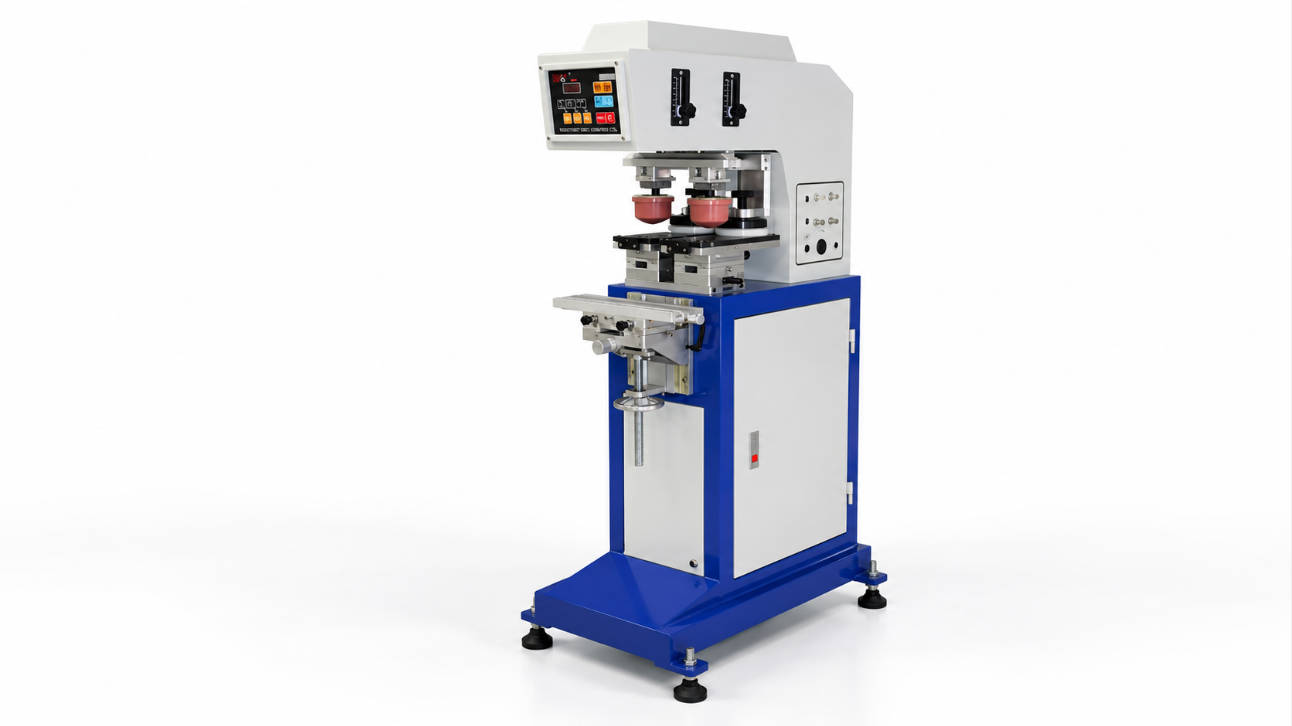
ENGY offers different pad printing machine configurations ranging from one-color equipment to multi-color and conveyor-based systems, including equipment configured for golf ball printing.
So the real purchasing question is not simply:
“Which golf ball printer should I buy?”
It is:
“How many times must the ball be positioned, printed and moved before one finished golf ball leaves the machine?”
Answer that first, and the correct machine configuration becomes much clearer.
Why Golf Balls Are a Special Pad Printing Application
Pad printing is well suited to products that are not flat because the silicone pad deforms during image transfer.
A golf ball pushes this advantage further because its surface combines:
- spherical geometry
- multiple recessed dimples
- a relatively small printable area
- strict logo positioning requirements
- possible printing on opposite sides
- possible multi-color registration
The printing process therefore has to solve two different problems.
Printing Problem
Can the pad transfer the complete image onto the dimpled curved surface?
Positioning Problem
Can every ball arrive under the pad in the same orientation?
In mass production, the second problem can become more difficult than the first.
The printing head creates the image, but the fixture and handling system determine whether that image appears in the correct location repeatedly.
This is why fixture design deserves to be considered before conveyor speed or machine cycle rate.
Start with the Finished Golf Ball, Not the Machine Catalog
Before selecting equipment, define what the finished golf ball needs to look like.
For example:
Project A
- One black logo
- One side only
- Manual loading
- Small batches
Project B
- Logo on Side A
- Model text on Side B
- Two printing positions
- Medium production volume
Project C
- Multi-color logo
- Additional marking on opposite side
- Continuous production
- Automatic product transfer
Although all three applications involve the same golf ball, they require very different equipment.
A useful project specification should begin with:
| Requirement | Information to Define |
| Number of printed sides | One side, opposite sides, or several positions |
| Number of colors | One, two, four, six, etc. |
| Logo dimensions | Width × height |
| Artwork relationship | Independent graphics or registered colors |
| Production volume | Batch, daily or continuous production |
| Loading | Manual or automatic |
| Ball rotation | Manual, indexed or automatic |
| Inspection | Operator inspection or integrated inspection |
| Unloading | Manual collection or automatic discharge |
This is much more useful than choosing a machine from the maximum color count alone.
The Fixture Is the Starting Point of Golf Ball Printing
A flat product can often sit inside a simple nest.
A golf ball cannot.
Without controlled support, it can rotate between loading and printing, changing the logo position.
What Should a Golf Ball Fixture Do?
A suitable fixture should:
- hold the ball at a repeatable center position
- prevent unwanted movement during pad compression
- allow efficient loading and unloading
- avoid damaging the ball surface
- leave the required printing area accessible
- support controlled rotation when several positions are printed
ENGY notes that pad printing fixtures should be made according to the actual product and are used to stabilize products with different shapes during printing.
For golf balls, this is particularly important because there is no naturally flat locating surface.
One Fixed Position
For a single logo, the fixture can be relatively straightforward.
The operator places the golf ball into a defined position and the pad prints one area.
This configuration may be suitable for:
- customer samples
- promotional golf balls
- small custom batches
- one-side branding
Multiple Positions
Suppose one golf ball needs:
Logo A → rotate 180° → Logo B
Now the fixture must either allow controlled repositioning or work together with an indexing mechanism.
The ball should not simply be picked up and rotated approximately by an operator when repeatability is important.
A positioning system may use:
- shaped locating elements
- indexing mechanisms
- controlled rotation
- multiple fixtures
- dedicated transfer stations
For two-sided golf ball printing, repeatable angular positioning is often more important than increasing machine printing speed.
Do You Really Need 360-Degree Positioning?
“360-degree golf ball printing” can be misunderstood.
It does not necessarily mean continuously printing an image around the complete circumference.
In many production applications, it means being able to orient the golf ball to different angular positions so several logos or markings can be applied around the surface.
For example:
Position 1: Brand logo
Position 2: Alignment marking
Position 3: Product model
Position 4: Custom customer graphic
The machine or fixture must move the golf ball to each required orientation.
The engineering question is therefore:
How many indexed positions are required?
Not:
Can the golf ball rotate 360 degrees?
If only two opposite logos are needed, a simple 180-degree indexing solution may be sufficient.
If several locations are printed, more controlled indexing positions may be required.
Avoid adding unnecessary motion complexity to the machine.
Ink Cup Size: Start from the Logo, Not the Golf Ball
A golf ball has a standardized general product form, but logos can vary significantly.
The ink cup therefore should not be selected from golf ball diameter alone.
Instead, start from:
Final artwork width × final artwork height
The ink cup, cliché and machine stroke must provide sufficient usable image area for the complete engraving.
ENGY explains that ink cup diameter and machine stroke influence maximum image dimensions in closed-ink-cup pad printing systems. (ENGYPRINT)
Example Selection Logic
Suppose a customer needs a compact one-color logo.
The engineering sequence should be:
Artwork size
↓
Required usable cliché area
↓
Suitable ink cup
↓
Compatible plate
↓
Machine stroke
This avoids choosing an unnecessarily large ink system.
Why a Larger Ink Cup Is Not Automatically Better
A larger cup can increase available image capacity, but it may also require:
- a larger cliché
- a wider machine structure
- additional cup travel
- more installation space
For golf ball logos that occupy only a limited surface area, the correct goal is enough capacity with suitable working clearance.
Ink cup size should match the artwork and machine configuration rather than being maximized for its own sake.
For equipment selection, buyers can compare ENGY’s closed ink cup and multi-color pad printing machines according to artwork and production requirements.
The Silicone Pad Has to Follow the Dimples
The ink cup supplies ink to the engraved image.
The silicone pad has the next challenge: transferring that image onto a curved, dimpled surface.
For golf ball printing, pad selection should consider:
- logo dimensions
- curvature of the ball
- depth and distribution of dimples
- printing position
- pad hardness
- pad shape
- compression
A pad that is too flat or poorly matched to the product may not conform appropriately to the surface.
A pad that is too soft may deform excessively depending on the artwork and machine setup.
The correct pad therefore needs to be tested together with:
- artwork
- ink
- cliché
- actual golf ball sample
ENGY manufactures pad printing machines together with related consumables and notes that pad shape and hardness should be selected according to the application.
One Color, Two Colors or Six Colors?
Color count has a major influence on golf ball printer configuration.
One-Color Golf Ball Printing
This is the simplest configuration.
Typical process:
Load → Position → Print → Unload
It can work well for:
- black logos
- single-color brand marks
- model numbers
- promotional printing
- simple identifiers
A one-color machine with an appropriate golf ball fixture can be sufficient when production volume does not require sophisticated automation.
Two-Color Logo Printing
Once two colors form one logo, registration becomes important.
The system must ensure that Color 2 aligns with Color 1.
This can require:
- controlled product positioning
- shuttle movement
- multiple print stations
- stable fixture geometry
- accurate cliché alignment
If the two colors are completely separate markings in different areas, the setup may be different from printing two registered colors within one graphic.
So the quotation request should specify whether the colors:
overlap/register
or
appear independently.
Multi-Color Golf Ball Printing
For more complex branding, the machine may require several printing stations.
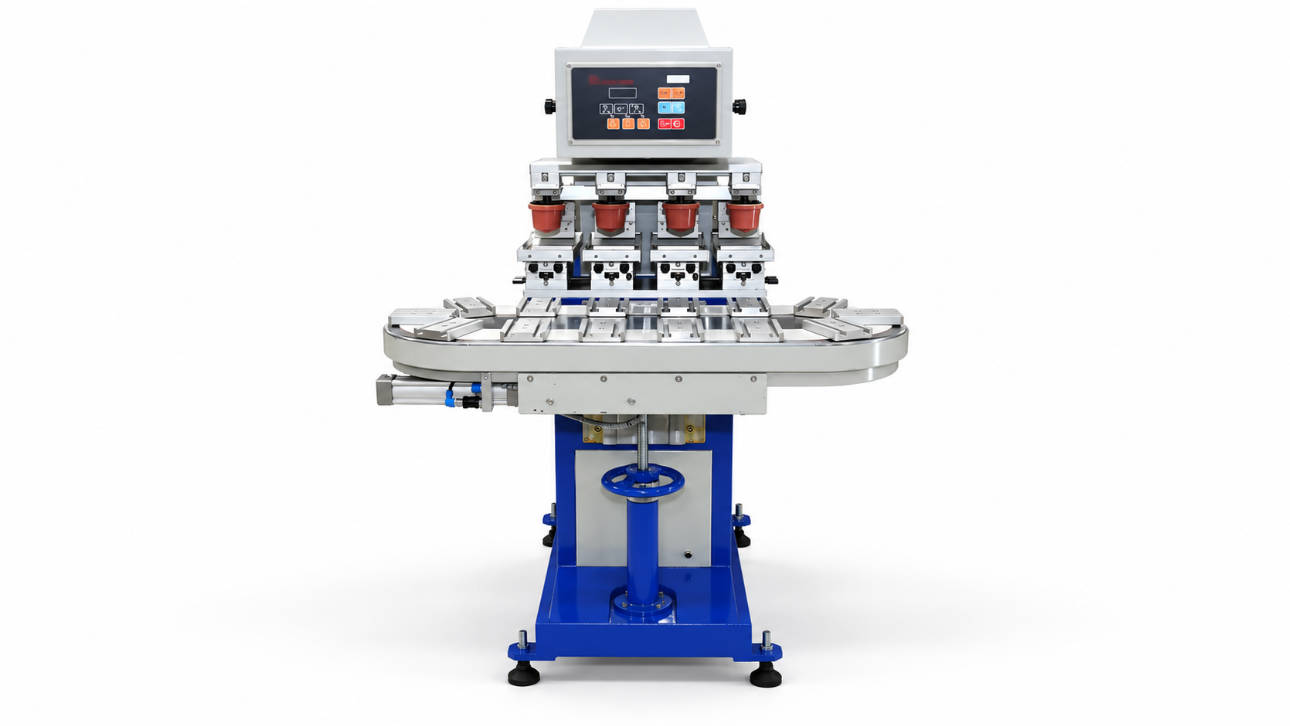
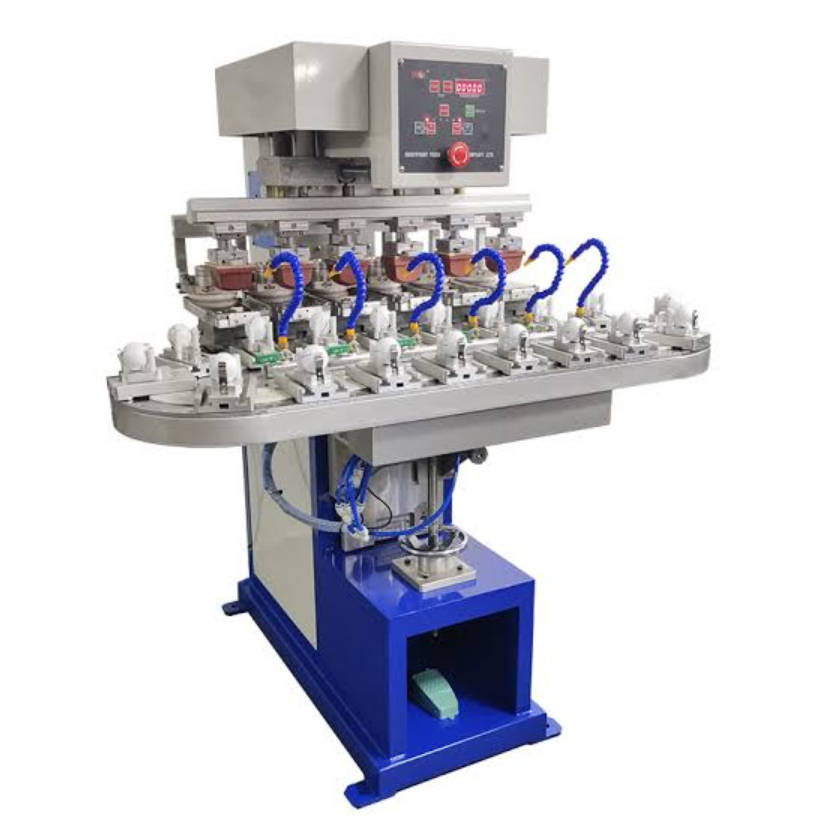
ENGY’s current pad printing range includes a six-color closed ink cup pad printer with conveyor for golf balls, demonstrating how conveyor-based movement can be combined with multi-color golf ball printing. (ENGYPRINT)
A multi-color system may need to coordinate:
Station 1 → Station 2 → Station 3 → Station 4 → Station 5 → Station 6
The golf ball must remain predictably positioned through the complete sequence.
At this stage, product handling becomes part of printing accuracy.
When Does a Conveyor Become Useful?
A conveyor does more than move golf balls from left to right.
Its real value is creating a controlled production sequence.
Consider a six-color application.
Without a conveyor, the operator may need to:
- Load the ball
- Print Color 1
- Reposition the ball
- Print Color 2
- Reposition again
- Continue through the remaining colors
- Remove the finished ball
This can become labor-intensive and difficult to scale.
With a suitable conveyor configuration, the product can move systematically between stations.
A simplified process might look like:
Loading → Color 1 → Color 2 → Color 3 → Color 4 → Color 5 → Color 6 → Unloading
ENGY identifies conveyor-based multi-color machines as part of its pad printing equipment range and also supports automatic loading and unloading configurations.
Conveyor Is More Valuable When:
- production volume is high
- several colors are required
- every ball follows the same print sequence
- manual movement limits output
- multiple stations need synchronization
- production runs are relatively stable
Conveyor May Be Unnecessary When:
- only one color is printed
- batch quantities are small
- artwork changes frequently
- manual loading remains efficient
- product rotation is more important than linear transport
Do not add a conveyor because the application is a golf ball. Add it because the production sequence requires controlled movement between operations.
Fixture Quantity Can Determine Throughput
Buyers often focus on machine speed but ignore fixture quantity.
Suppose a machine uses only one golf ball holder.
The cycle may involve:
Load → Print → Unload → Reload
Now consider multiple fixtures moving through a conveyor.
While one golf ball is being printed at Station 2:
- another can be entering Station 1
- another can be moving toward Station 3
- another may already be leaving the system
This allows operations to overlap.
The required fixture quantity therefore depends on:
- number of stations
- conveyor pitch
- loading location
- unloading location
- indexing sequence
- required production speed
For a customized system, fixture quantity should be calculated from the entire process rather than chosen independently.
Ink Durability Starts with the Golf Ball Surface
A perfect-looking print immediately after printing does not automatically mean the ink system is suitable.
Golf balls can have different outer surface materials and coatings depending on product construction.
That means ink adhesion should be evaluated on the actual golf ball to be printed.
Important factors include:
- surface material
- surface coating
- ink compatibility
- ink viscosity
- drying conditions
- pretreatment requirements
- curing requirements
ENGY states that substrate material influences ink selection and that certain printing applications may require pretreatment or post-printing treatment depending on the material and ink system. (ENGYPRINT)
Why Samples Matter
Two golf balls that look almost identical may not have identical surface chemistry.
Therefore, for production projects, provide actual samples whenever possible.
A useful sample test can evaluate:
- image completeness
- adhesion
- color appearance
- dimple coverage
- drying
- resistance required by the application
Ink durability should be verified on the customer’s actual golf ball rather than assumed from the product category alone.
Manual, Semi-Automatic or Automatic Golf Ball Printing?
The right automation level depends more on production volume than on the physical size of the golf ball.
| Production Requirement | More Suitable Direction |
| Samples and prototype logos | Manual loading |
| Small promotional batches | One-color/semi-automatic system |
| Repeated medium batches | Multi-fixture or indexing solution |
| Multi-color production | Shuttle or conveyor system |
| Continuous high-volume printing | Automatic conveyor system |
| Repetitive loading problem | Automatic feeding |
| Multiple logo positions | Automatic/indexed ball rotation |
| Continuous finished-part collection | Automatic unloading |
This provides a better purchasing framework than simply asking for an “automatic golf ball printer.”
A Golf Ball Printing Line Can Be Built in Layers
One useful way to control machine cost is to separate the project into levels.
Level 1 — Printing
Machine + cliché + pad + ink system.
Suitable for basic one-position printing.
Level 2 — Positioning
Add a golf ball-specific fixture.
This improves repeatability.
Level 3 — Rotation
Add controlled indexing when the ball requires printing at several angular positions.
Level 4 — Transfer
Add shuttle or conveyor movement when several printing stations are involved.
Level 5 — Automation
Add automatic loading, unloading or other handling systems when labor becomes the bottleneck.
This layered approach prevents over-automating a relatively simple golf ball printing requirement.
ENGY supports standard and customized pad printing equipment as well as automation options for applications requiring feeding, conveyors and product handling.
Five Common Golf Ball Printer Selection Mistakes
Mistake 1: Choosing from Color Count Alone
A six-color machine is not automatically the correct machine for a six-color golf ball.
You still need to define:
- product positioning
- color registration
- logo locations
- product movement
Mistake 2: Ignoring Ball Rotation
If logos appear on opposite sides, the machine needs a method to reproduce the required angular position.
Manual approximation may not provide sufficient repeatability.
Mistake 3: Selecting the Ink Cup from Ball Diameter
The ink cup relates to artwork and cliché requirements.
The golf ball diameter itself does not determine the ink cup size.
Mistake 4: Asking for Maximum Machine Speed
A machine may cycle quickly while the operator spends most of the time loading and orienting golf balls.
Measure the complete production cycle.
Mistake 5: Ordering Before Testing the Actual Golf Ball
Artwork, pad selection and ink adhesion should be evaluated on the real product whenever possible.
This is especially important when surface coatings or golf ball models vary.
How to Request a Golf Ball Pad Printing Machine Quote
A good RFQ can be surprisingly short if it contains the right information.
Send the Golf Ball
Provide:
- actual sample if possible
- ball specification
- surface material or coating information if known
Send the Artwork
Provide:
- vector artwork
- final logo dimensions
- number of colors
Mark Every Printing Position
Do not say only:
“Print two logos.”
Specify:
Logo A: Position 1
Logo B: opposite side
or provide a drawing showing the angular relationship.
State Production Volume
Provide:
- quantity per batch
- expected daily output
- working hours per day
Define Automation Expectations
State whether you need:
- manual loading
- conveyor movement
- ball rotation
- automatic feeding
- automatic unloading
A useful quotation request might read:
We need to print a three-color registered logo on one side of a golf ball and one black marking on the opposite side. Daily production is approximately [quantity]. Please recommend the fixture, ink system and automation configuration based on the attached golf ball sample and artwork.
This tells the supplier much more than:
Please quote a golf ball printing machine.
A Practical Machine Selection Matrix
| Requirement | Suggested Equipment Direction |
| One logo, one color, small batch | One-color machine + golf ball fixture |
| Two independent logos on opposite sides | Fixture + controlled ball rotation |
| Two registered colors | Multi-color machine + stable registration |
| Several colors on one side | Multi-color shuttle/conveyor configuration |
| Several print positions around ball | Indexed rotation system |
| High-volume repeated production | Conveyor-based system |
| High-volume + repetitive loading | Conveyor + automatic loading |
| Complex multi-color continuous line | Customized automatic golf ball pad printer |
This table should be treated as an initial configuration guide rather than a universal equipment specification.
Actual machine selection still depends on the artwork, golf ball sample and output target.
What Should You Compare Between Golf Ball Printer Quotations?
Do not compare only machine prices.
Check whether each quotation includes:
- machine
- golf ball fixture
- number of fixtures
- ink cups
- cliché plates
- silicone pads
- required color stations
- conveyor
- ball rotation/indexing system
- automatic loading
- unloading
- controls
- sampling and testing
- replacement consumables
Two quotations can look very different simply because one includes the complete production system while the other covers only the printing machine.
Compare the cost of producing the finished golf ball, not only the cost of the printer body.
FAQ
What machine is used to print logos on golf balls?
A pad printing machine is commonly suitable for applying logos, text and multi-color graphics to golf balls because the silicone pad can conform to curved and dimpled surfaces.
Can pad printing print on golf ball dimples?
Yes. A properly selected silicone pad can deform around the golf ball surface and transfer ink across curved and recessed areas. Pad shape, hardness and artwork should be tested for the specific application.
How do you print logos on both sides of a golf ball?
The golf ball must be repositioned or indexed between printing operations. A fixture or automated rotation system can control the angular relationship between the two print positions.
Does a golf ball pad printer need a special fixture?
Yes, a golf ball typically requires a dedicated fixture because its spherical shape can rotate freely. The fixture should control its center position and orientation during printing.
What ink cup size is needed for golf ball logo printing?
Ink cup size depends mainly on the artwork dimensions, cliché layout and machine stroke rather than the diameter of the golf ball itself.
Can a golf ball pad printing machine print multiple colors?
Yes. Multi-color pad printing systems can apply several colors using multiple ink systems and printing stations. Accurate registration becomes increasingly important as color count increases.
When should I use a conveyor golf ball printer?
A conveyor becomes useful for repetitive multi-station production, particularly when several colors or sequential operations must be performed at higher volume.
Can golf ball loading be automated?
Yes. Automatic product handling can be considered when manual loading and orientation become bottlenecks. The feeding mechanism needs to be designed around the golf ball and required orientation.
How durable is pad printing ink on golf balls?
Durability depends on the golf ball surface, coating, ink system, drying and possible treatment requirements. Adhesion should be tested on the actual golf ball before production.
What information is needed for an automatic golf ball pad printer quote?
Provide golf ball samples, artwork, logo dimensions, color count, print positions, daily production requirement and desired loading, rotation, conveyor and unloading method.
Conclusion: Design the Machine Around the Ball’s Journey
Choosing a golf ball pad printing machine should not begin with the number of colors.
Begin by following one golf ball through the process:
How does it enter?
How is it located?
Where is Logo 1 printed?
Does it need to rotate?
Where are the remaining colors or logos printed?
How does it leave the machine?
Once these questions are answered, fixture quantity, ink cup size, indexing and conveyor requirements can be selected much more accurately.
For simple one-color golf ball printing, a standard machine with a dedicated fixture may be sufficient.
For opposite-side logos, controlled rotation becomes important.
For registered multi-color graphics, product positioning becomes increasingly critical.
For repetitive high-volume production, conveyor movement and automatic handling may become more valuable than increasing the printing speed of an individual station.
A good automatic golf ball pad printer is therefore not just a fast printing machine—it is a system that keeps every golf ball correctly positioned from loading through the final print.
You can review ENGY’s Pad Printing Machine B Series for one-color, multi-color and conveyor-based equipment configurations.
For additional pad printing equipment, consumables and customized printing solutions, visit ENGY.
Related Reading
- Top 5 Industries That Rely on Pad Printing Technology
- How does the ink cup system design influence multi-color alignment
- What Is the Printing Accuracy of a Pad Printing Machine? A Complete
- Sealed Ink Cup Pad Printer Buying Guide for Industrial Product Decoration
- Sealed Ink Cup for Pad Printing: A Complete Beginner’s Guide