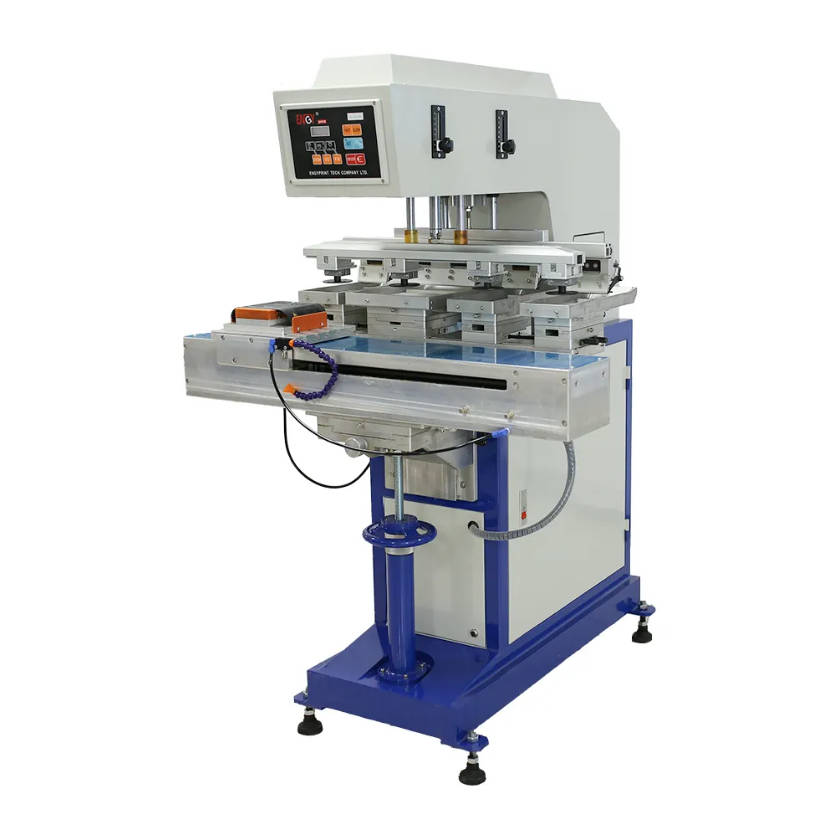
Choosing the right pad printing machine is not only about machine price. A suitable machine should match your product shape, printing size, number of colors, production volume, fixture design, and ink system. If the machine does not match your product, you may face poor ink transfer, inaccurate positioning, slow production, or unstable printing quality.
The best way to choose a pad printing machine is to evaluate your product shape, print area, color requirement, production capacity, and fixture design before selecting the machine model.
For buyers who need to print logos, marks, patterns, or text on pens, bottle caps, toys, golf balls, medical parts, electronic components, cosmetic packaging, or plastic products, this guide will help you understand how to choose the right pad printer for your application.
If you are looking for industrial pad printing equipment, you can also check our Pad Printing Machine category page for available machine options.
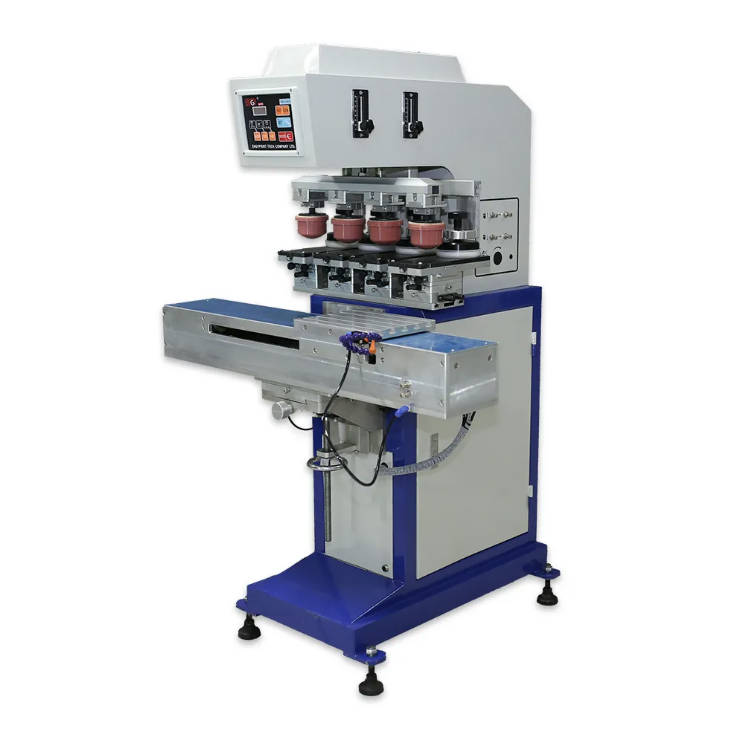
What Is a Pad Printing Machine Used For?
A pad printing machine is used to transfer ink from a printing plate onto a product surface through a flexible silicone pad. Because the silicone pad can adapt to different shapes, pad printing is widely used for products that are difficult to print with flat printing methods.
Pad printing is suitable for:
- Curved surfaces
- Round products
- Uneven surfaces
- Recessed areas
- Small logos
- Fine text
- Irregular industrial parts
- Plastic, metal, glass, rubber, and coated materials
Common applications include:
- Pens and promotional gifts
- Bottle caps and closures
- Golf balls
- Toys
- Medical devices
- Watch parts
- Camera parts
- Electronic components
- Cosmetic packaging
- Plastic and metal parts
Step 1: Check Your Product Shape
Product shape is the first factor when choosing a pad printing machine.
If your product is flat, many printing methods may work. But if your product is curved, round, uneven, concave, convex, or irregular, pad printing is usually a better choice.
For example:
| Product Shape | Recommended Printing Solution |
| Round pen barrel | Pad printing machine |
| Bottle cap top surface | Pad printing machine |
| Golf ball surface | Pad printing machine with fixture |
| Small plastic toy | Pad printing machine |
| Flat large panel | Screen printing may be considered |
| Recessed product area | Pad printing machine |
If your product has a curved or irregular surface, a pad printing machine is usually more suitable than direct screen printing.
The silicone pad can deform slightly and transfer the image onto surfaces that are difficult to reach with other printing methods.
Step 2: Confirm the Print Size
The second important factor is the printing size.
Different pad printers support different plate sizes, ink cup sizes, and pad sizes. If your logo or artwork is too large, a small pad printer may not cover the full image area.
Before choosing the machine, you should confirm:
- Logo width
- Logo height
- Printing position
- Plate size requirement
- Pad size requirement
- Ink cup diameter
- Whether the image is single-position or multi-position
For small logos, a one-color or two-color pad printing machine may be enough. For larger artwork, you may need a machine with a larger plate size or an open tray structure.
Step 3: Choose the Right Ink System
Pad printing machines commonly use two ink systems:
- Closed ink cup system
- Open tray system
Closed Ink Cup Pad Printer
A closed ink cup pad printer uses a sealed ink cup to hold and control the ink. It is suitable for stable production, cleaner operation, and lower solvent evaporation.
It is often used for:
- Small to medium logos
- Repeated batch production
- Cleaner working environments
- Industrial product decoration
- Pens, caps, toys, golf balls, medical parts, and electronic components
Open Tray Pad Printer
An open tray pad printer uses an open ink tray. It is more flexible for larger plate sizes and bigger printing areas.
It is often used for:
- Larger artwork
- Wider printing areas
- Products requiring frequent ink adjustment
- Special industrial printing applications
For most small and medium industrial products, a closed ink cup pad printer is often preferred because it provides better ink control and cleaner operation.
Step 4: Decide How Many Colors You Need
The number of colors directly affects machine selection.
If your product only needs one logo color, a one-color pad printing machine is usually enough. If your logo has two or more colors, you may need a two-color, four-color, or multi-color pad printer.
| Color Requirement | Machine Suggestion |
| One-color logo | One-color pad printer |
| Two-color logo | Two-color pad printer |
| Three or four-color design | Four-color pad printing machine |
| Complex multi-color product | Customized multi-color pad printer |
| High-volume multi-color printing | Pad printer with turntable or conveyor |
For multi-color printing, fixture accuracy becomes very important. If the product moves during printing, the colors may not align correctly.
So when choosing a multi-color pad printing machine, you should pay attention to:
- Machine positioning accuracy
- Fixture stability
- Product loading method
- Color registration requirement
- Operator skill level
- Production speed
Step 5: Estimate Your Production Output
Production volume is another key factor.
Different buyers have different production requirements. Some only need small batch logo printing, while others need continuous industrial production.
Ask yourself:
- How many pieces do you need to print per hour?
- Is the product loaded manually or automatically?
- Do you need semi-automatic or automatic operation?
- Will the product be printed in one position or multiple positions?
- Do you need a conveyor, turntable, or automatic feeding system?
For small-batch production, a semi-automatic pad printing machine may be enough. For large-volume production, an automatic pad printing machine with customized fixtures can improve efficiency.
Step 6: Consider Fixture Design
Fixture design is often ignored, but it is one of the most important parts of pad printing.
A pad printing fixture holds the product in the correct position during printing. If the fixture is not stable, the logo may shift, become blurred, or fail to align with other colors.
Good fixture design can help:
- Improve printing accuracy
- Reduce product movement
- Keep logo position consistent
- Support multi-color printing
- Improve production efficiency
- Reduce defective products
For irregular products, customized fixtures are usually required.
A good pad printing machine must work together with a suitable fixture. The machine alone cannot guarantee accurate printing if the product is not positioned correctly.
Step 7: Match the Silicone Pad to Your Product
The silicone pad is the part that transfers ink from the plate to the product. Different products require different pad shapes, hardness, and sizes.
When choosing a silicone pad, consider:
- Product surface shape
- Printing area size
- Logo details
- Ink transfer requirement
- Product material
- Printing position
A soft pad may work better for uneven surfaces, while a harder pad may provide better image clarity on stable surfaces. The pad shape should also match the product surface to avoid distortion.
Step 8: Check Product Material and Ink Adhesion
Different materials need different inks and pretreatment methods. A pad printing machine can print on many materials, but ink adhesion depends on the material surface and ink selection.
Common materials include:
- Plastic
- Metal
- Glass
- Rubber
- Silicone
- Ceramic
- Coated surfaces
Some plastics may require surface treatment before printing. Some products may need special ink for better adhesion, chemical resistance, or wear resistance.
Before ordering a machine, it is best to test the real product sample with the correct ink.
Step 9: Compare Manual, Semi-Automatic, and Automatic Pad Printers
Pad printing machines can be manual, semi-automatic, or automatic.
| Machine Type | Best For | Main Advantage |
| Manual pad printer | Very small batch production | Low cost and simple operation |
| Semi-automatic pad printer | Small to medium production | Good balance of cost and efficiency |
| Automatic pad printer | Large-volume production | Higher output and stable production |
| Pad printer with conveyor | Continuous production | Better efficiency for mass production |
| Pad printer with turntable | Multi-station printing | Suitable for multi-color or repeated printing |
For most industrial buyers, a semi-automatic pad printing machine is a practical starting point. If production volume is high, an automatic solution may be better.
Step 10: Ask for a Sample Printing Test
Before buying a pad printing machine, a sample printing test is highly recommended.
A test can help confirm:
- Whether the machine can print your product clearly
- Whether the ink adheres well
- Whether the logo size is suitable
- Whether the fixture design works
- Whether the silicone pad transfers ink correctly
- Whether the printing result meets your quality standard
A sample printing test is the most reliable way to confirm whether a pad printing machine is suitable for your product.
You can send your product photo, logo file, material information, and printing requirements to the supplier for evaluation.
Common Mistakes When Choosing a Pad Printing Machine
Mistake 1: Only Comparing Machine Price
A cheaper machine may not be suitable if it cannot print your product clearly or efficiently. Always compare machine structure, plate size, ink system, fixture design, and after-sales support.
Mistake 2: Ignoring Product Shape
Pad printing machine selection should start from product shape. Curved and irregular products need suitable pad shape and fixture design.
Mistake 3: Choosing the Wrong Print Size
If the machine plate or ink cup is too small, the logo may not fit. Always confirm artwork size before choosing a model.
Mistake 4: Ignoring Fixture Design
The fixture affects printing accuracy. Poor fixtures cause misalignment and unstable production.
Mistake 5: Not Testing Ink Adhesion
Different materials need different inks. Testing is necessary before mass production.
Pad Printing Machine Selection Checklist
Before asking for a quotation, prepare the following information:
| Information Needed | Why It Matters |
| Product photo | Helps supplier understand product shape |
| Product size | Helps choose machine stroke and fixture |
| Product material | Helps choose suitable ink |
| Logo size | Helps confirm plate, pad, and ink cup size |
| Number of colors | Helps select one-color or multi-color machine |
| Printing position | Helps design fixture and pad movement |
| Required output | Helps choose semi-automatic or automatic machine |
| Sample product | Helps confirm real printing quality |
Which Pad Printing Machine Is Right for You?
You can use this simple guide:
Choose a one-color pad printing machine if your product only needs a simple logo or text in one color.
Choose a multi-color pad printing machine if your product needs two or more colors with accurate registration.
Choose a closed ink cup pad printer if you need cleaner operation, stable ink control, and lower solvent evaporation.
Choose an open tray pad printer if your artwork is larger or your plate size requirement is bigger.
Choose an automatic pad printing machine if you need higher production output and continuous operation.
Choose a customized pad printing machine if your product shape, feeding method, or printing position cannot be handled by a standard model.
Final Recommendation
Choosing the right pad printing machine depends on your product, not only the machine specification.
You should consider:
- Product shape
- Product material
- Print size
- Number of colors
- Required output
- Ink system
- Fixture design
- Silicone pad selection
- Ink adhesion requirement
- Automation level
If you want stable printing quality, lower defect rate, and better production efficiency, choose a pad printing machine based on your real product sample and printing requirement.
For industrial buyers, the best solution is to send product photos, logo size, material, and production requirements before selecting a model.
You can view our Pad Printing Machine options or contact us for a machine recommendation.
Need Help Choosing a Pad Printing Machine?
Not sure which pad printer is suitable for your product?
Send us:
- Product photo
- Product size
- Product material
- Logo size
- Number of colors
- Required production capacity
Our team can help you recommend a suitable pad printing machine, ink system, silicone pad, and fixture solution.
Send your product photo for machine recommendation and sample printing evaluation.
FAQ
How do I choose a pad printing machine?
To choose a pad printing machine, check your product shape, print size, number of colors, production volume, material, ink adhesion requirement, and fixture design. A sample printing test is recommended before ordering.
What products can a pad printing machine print?
A pad printing machine can print on pens, bottle caps, golf balls, toys, medical parts, electronic components, plastic parts, metal parts, cosmetic packaging, and other curved or irregular products.
Is pad printing suitable for curved surfaces?
Yes. Pad printing is especially suitable for curved, round, uneven, recessed, and irregular surfaces because the silicone pad can adapt to the product shape.
Should I choose a closed ink cup or open tray pad printer?
Choose a closed ink cup pad printer for stable ink control, cleaner operation, and small to medium print areas. Choose an open tray pad printer for larger artwork or bigger plate sizes.
How many colors can a pad printing machine print?
Pad printing machines can print one color, two colors, four colors, or more depending on the machine structure. Multi-color printing requires accurate fixture design and stable product positioning.
Do I need a custom fixture for pad printing?
In many cases, yes. A custom fixture helps hold the product in the correct position and improves printing accuracy, especially for irregular products or multi-color printing.